
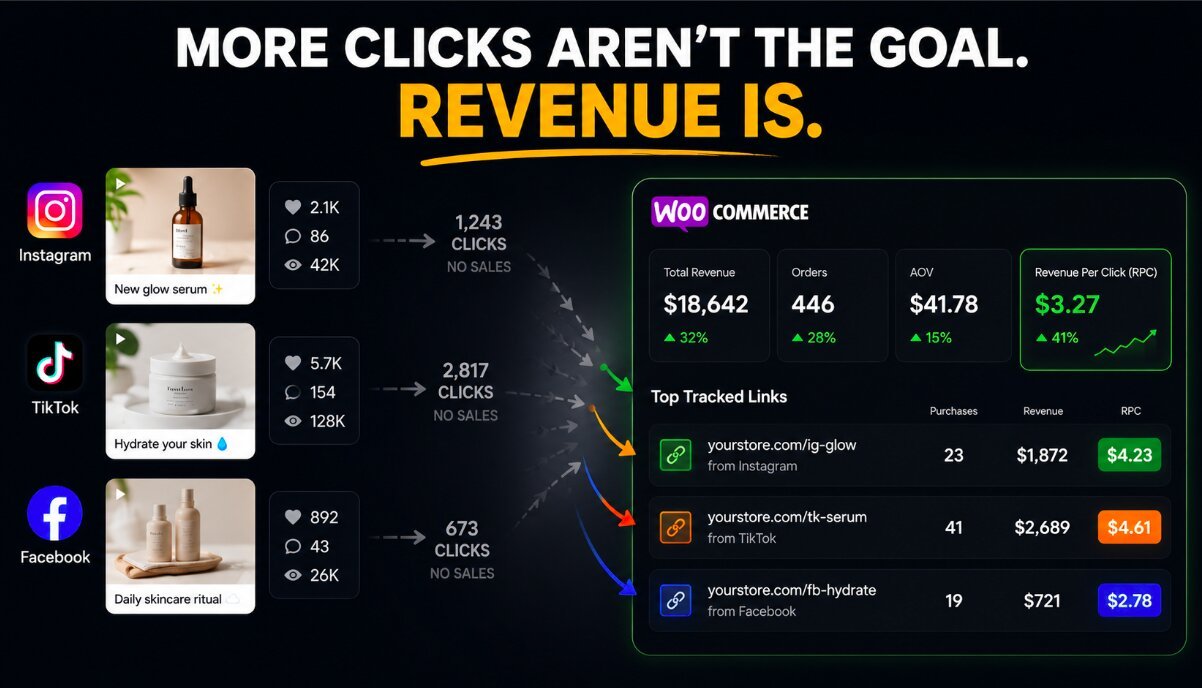
A viral social post feels like a win.
Thousands of views. Hundreds of likes. Comments pouring in.
But here is the question most ecommerce brands cannot answer:
Which exact post made someone buy?
That is the problem with most WooCommerce social media tracking setups. Brands can see attention, but they struggle to connect that attention to revenue.
A post can go viral and generate zero sales. Another post with a fraction of the reach can quietly become the biggest revenue driver of the month.
The difference is attribution.
Your WooCommerce Store Knows Sales. Social Media Knows Engagement. The Gap Is Attribution.
WooCommerce gives you important store data.
You can see:
- Orders
- Revenue
- Products sold
- Customer purchases
Social platforms give you engagement data.
You can see:
- Likes
- Shares
- Comments
- Reach
- Clicks
- Views
Both sides provide useful information.
The problem is the connection between them.
Most brands cannot clearly track the full journey:
Social post → Click → Product page → Purchase → Revenue
Instead, they make assumptions.
A post gets attention, so they assume it worked.
A creator gets engagement, so they assume they should invest more.
A video gets views, so they assume it drove growth.
This is where vanity metrics become dangerous.
Likes, comments, followers, reach, and impressions are not the problem.
The problem is treating them as proof of business impact.
A post with 50,000 views and zero purchases is not automatically better than a post with 2,000 views that generates $5,000 in sales.
Attention is not the goal.
Revenue is.
The Missing Piece in WooCommerce Social Media Tracking
Knowing which platform generated sales is only the beginning.
A store might know:
"Instagram generated $5,000 in revenue this month."
That sounds useful.
But it still leaves unanswered questions:
- Which Instagram post created those sales?
- Which creator drove the purchases?
- Which product link converted?
- Which campaign actually worked?
Instagram is not one marketing asset.
Neither is TikTok, Facebook, or Pinterest.
Each platform contains hundreds of individual opportunities.
A single campaign might include:
- Multiple posts
- Different creators
- Several product links
- Different audiences
- Different creative angles
Channel-level reporting hides those differences.
The real opportunity comes from link-level attribution.
Why Link-Level Attribution Changes Ecommerce Decisions
Imagine two social posts.
Post A
- 20,000 views
- 1,000 clicks
- $100 revenue
Post B
- 2,000 views
- 150 clicks
- $900 revenue
A traditional social dashboard highlights Post A.
More views.
More clicks.
More engagement.
But Post B is the actual winner.
It generated nine times more revenue with a smaller audience.
This is why social media sales tracking needs to go beyond engagement.
You need to know which content creates customers.
Revenue Per Click Shows the Real Value of Social Traffic
The metric that reveals the difference is Revenue Per Click (RPC).
RPC measures how much revenue each click generates.
The formula:
Revenue Per Click = Revenue ÷ Clicks
Using the example above:
Post A:
- $100 revenue
- 1,000 clicks
- RPC = $0.10
Post B:
- $900 revenue
- 150 clicks
- RPC = $6.00
The second post is dramatically more valuable.
It attracts fewer people.
But those people are more likely to buy.
This is the difference between optimizing for attention and optimizing for profitable growth.
How to Know Which Social Post Sold Your WooCommerce Products
Better attribution starts with better tracking.
The goal is simple:
Connect every important social interaction to actual store revenue.
Create Unique Tracking Links for Every Post
One of the biggest mistakes ecommerce brands make is sending every social post to the same generic link.
When everything points to one destination, attribution becomes unclear.
Each important post should have its own trackable link.
This includes:
- Instagram posts
- TikTok videos
- Facebook posts
- Pinterest pins
- Influencer collaborations
- Creator campaigns
- Paid social ads
A creator promoting your product should have a unique link.
A product demo video should have a unique link.
A seasonal campaign should have a unique link.
The more specific the tracking, the clearer the revenue picture becomes.
This is the foundation of effective ecommerce link tracking.
Connect Social Clicks to WooCommerce Purchases
Clicks are useful.
But clicks are not revenue.
Many analytics tools stop at the first half of the journey.
They tell you:
"People clicked."
They do not always tell you:
"Those clicks created $X in sales."
The complete journey should look like this:
Social post → Tracked link → Store visit → Product purchase → Revenue attribution
That connection allows you to answer the questions that actually affect decisions.
Which creators deserve more budget?
Which posts should be repeated?
Which campaigns should be stopped?
Measure Revenue Per Click Instead of Engagement
Most brands still evaluate social content using surface-level signals.
They ask:
- How many likes did it get?
- How many views did it receive?
- How many followers saw it?
Better questions are:
- How many buyers did it create?
- How much revenue did it generate?
- What was the Revenue Per Click?
RPC changes content evaluation.
A low-engagement post can become a winner if it attracts high-intent buyers.
A high-engagement post can become a waste if it only creates curiosity.
Find Your Hidden Revenue Winners
The best-performing content is often not the content you expect.
Attribution frequently reveals surprising winners.
Examples:
A small creator drives more sales than a large influencer.
A detailed product demo beats a viral meme.
A niche audience converts better than broad reach.
A simple product comparison post outperforms a highly produced campaign.
Without revenue attribution, these patterns are easy to miss.
You keep rewarding popularity instead of profitability.
Stop Boosting Posts That Only Create Traffic
Many brands spend money promoting posts because the numbers look good.
The post gets:
- Cheap clicks
- High engagement
- Strong reach
But purchases remain low.
That is not growth.
That is buying attention.
Paid promotion should amplify what already works.
If a post attracts buyers, increase investment.
If it only attracts browsers, the data should tell you to move on.
Revenue should decide what gets scaled.
Not engagement.
Social Metrics vs Revenue Attribution
Metric | What It Shows| What It Misses | Better Alternative
Likes | Engagement | Sales impact | Revenue attribution
Views | Reach | Buyer intent | Purchases
Clicks | Interest | Revenue | Revenue Per Click
Platform analytics | Channel performance | Specific post sales | Link tracking
The problem is not that social metrics are useless.
The problem is stopping there.
A business needs to know what creates revenue.
Common Mistakes Brands Make With Social Analytics
Many WooCommerce brands make the same attribution mistakes.
They:
- Judge campaigns by likes instead of sales
- Compare creators by follower count
- Track clicks without connecting purchases
- Use broad channel reports instead of link data
- Assume viral content equals profitable content
- Rely only on UTM tracking
UTMs can help organize campaigns.
They do not automatically show which specific content creates revenue.
The closer you get to the actual buying event, the better your decisions become.
Know Which Social Posts Actually Make Money
Linkorio helps WooCommerce brands connect social activity to actual revenue.
Instead of only seeing clicks, views, or engagement, you can identify which links, posts, creators, and campaigns generate purchases.
That means you can understand:
- Which content drives buyers
- Which creators deserve more investment
- Which campaigns produce real returns
- Which traffic sources are worth scaling
The goal is not collecting more social data.
The goal is understanding what that data means for revenue.
Conclusion
The goal is not to create the most popular posts.
The goal is to create posts that generate profitable customers.
Most brands optimize for attention.
Winning brands optimize for revenue.
By improving WooCommerce social media tracking, connecting social links to purchases, and measuring Revenue Per Click, ecommerce teams can stop guessing and start investing based on what actually works.
The future of social commerce belongs to brands that understand one thing:
The best post is not the one people talk about.
It is the one that creates customers.
FAQ
What is WooCommerce social media tracking?
WooCommerce social media tracking connects social activity, clicks, and marketing links to store purchases. It helps brands identify which posts and campaigns generate revenue.
Why don't likes and views prove a social post worked?
Likes and views measure attention, not business results. A post can receive thousands of interactions and still generate no sales.
How can I track social media conversions in WooCommerce?
You can track social media conversions by assigning unique tracking links to posts, creators, and campaigns, then connecting clicks to WooCommerce purchases.
What is Revenue Per Click (RPC)?
Revenue Per Click measures the revenue generated from each click. It is calculated by dividing total revenue by total clicks and helps identify profitable traffic sources.
Are UTM links enough for WooCommerce attribution?
UTMs help categorize traffic but often do not provide detailed post-level revenue attribution. They show where traffic came from, but not always which exact link drove sales.
Can social link tracking improve influencer marketing?
Yes. Link-level tracking allows brands to compare influencers based on actual revenue generated instead of followers, likes, or engagement rates.