

You’re posting on Twitter/X, getting clicks… maybe even sales.
But here’s the problem:
you don’t actually know which tweet made you money.
Was it your viral thread?
That random reply?
Or a link you dropped 3 weeks ago?
Without proper tracking, you’re guessing — and guessing doesn’t scale.
In this guide, you’ll learn exactly how to track revenue from your Twitter/X posts, so you can double down on what works and stop wasting time on what doesn’t.
Why Tracking Revenue From X Posts Is Hard
Most creators rely on basic metrics:
- Likes
- Retweets
- Clicks
But none of these answer the only question that matters:
Which tweet made me money?
The core problem
Twitter/X doesn’t:
- Track conversions
- Attribute revenue to specific posts
- Show which content drives actual sales
So everything looks like this:
- “This tweet got 10k views”
- “This one got 200 clicks”
But:
👉 You don’t know which one converted
The Core Principle: Track Links, Not Posts
Here’s the shift that changes everything:
You don’t track tweets — you track links per tweet.
Instead of using one generic link like:
linkorio.com/yourpage
You create unique links per post.
Example
Instead of:
- linkorio.com/yourpage
You use:
- linkorio.com/x-morning-routine
- linkorio.com/x-productivity-thread
- linkorio.com/x-side-hustle-post
Now you can see:
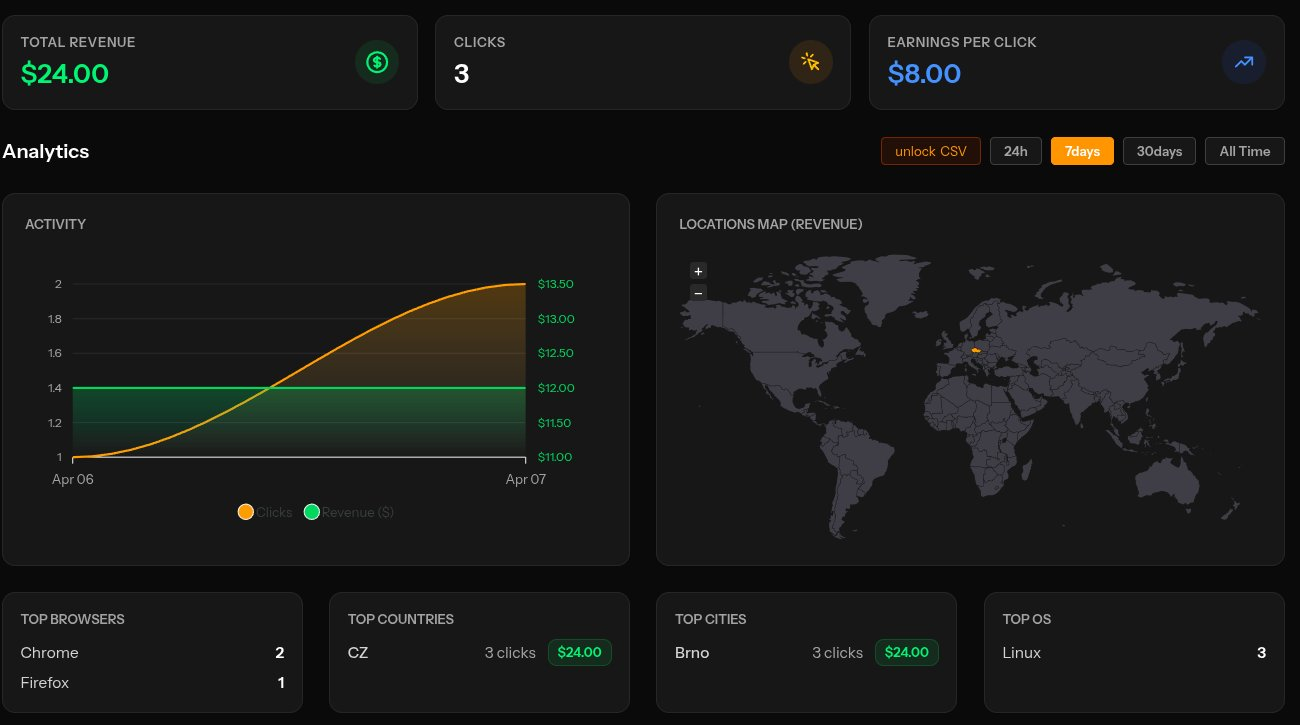
- Clicks per tweet
- Conversions per tweet
- Revenue per tweet
Step-by-Step: How to Track Revenue From X
Step 1: Create a unique tracking link
For every tweet that matters:
- Create a new Linkorio link
- Give it a clear name
Naming formula:
platform + content + angle
Examples:
- x-notion-template-thread
- x-ai-tools-list
- x-student-productivity
👉 This makes your data readable later.
Step 2: Add your destination (product, affiliate, etc.)
Your link should point to:
- Your product page
- Gumroad / Stripe checkout
- Affiliate link
Step 3: Enable revenue tracking
This is the part most people skip.
You need to connect:
- Conversion event (purchase, signup)
- Revenue value
With Linkorio, you can:
- Track conversions per link
- See revenue generated per link
Now each link becomes a mini analytics unit.
Step 4: Use the link in your tweet
Instead of reusing one link everywhere:
❌ Bad:
“Check this out → linkorio.com/my-page”
✅ Good:
“I made a Notion template that helps students stay organized → linkorio.com/x-notion-template-thread”
Step 5: Analyze what actually makes money
After a few days, your data will show:
- Link A → 120 clicks → €0
- Link B → 80 clicks → €240
- Link C → 300 clicks → €50
Now you know:
👉 What content converts — not just what gets attention
What You Should Actually Optimize
Once you have revenue data, focus on:
Content angle
- Tutorials vs storytelling
- Lists vs personal experience
Audience intent
- Are they ready to buy?
- Or just browsing?
Call to action (CTA)
Compare:
- “Check this out”
- vs
- “This saved me 5 hours/week → try it here”
Real insight
In practice, you’ll often find:
- Viral tweets ≠ highest revenue
- Smaller, targeted tweets → convert better
Common Mistakes to Avoid
❌ Using one link everywhere
You lose all attribution.
❌ Tracking only clicks
Clicks don’t equal money.
❌ Not naming links properly
“link1”, “test2” = useless data later.
❌ Ignoring low-click, high-revenue posts
These are your goldmine.
Conclusion
If you’re not tracking revenue from your Twitter/X posts, you’re flying blind.
The solution is simple:
- Create unique links per tweet
- Track conversions + revenue
- Optimize based on real results
That’s how you go from:
“I hope this works”
to:
“I know this makes money”
Start tracking your Twitter/X revenue today with Linkorio:
👉 Create your first tracked link
👉 Post it on X
👉 See exactly which content pays off