
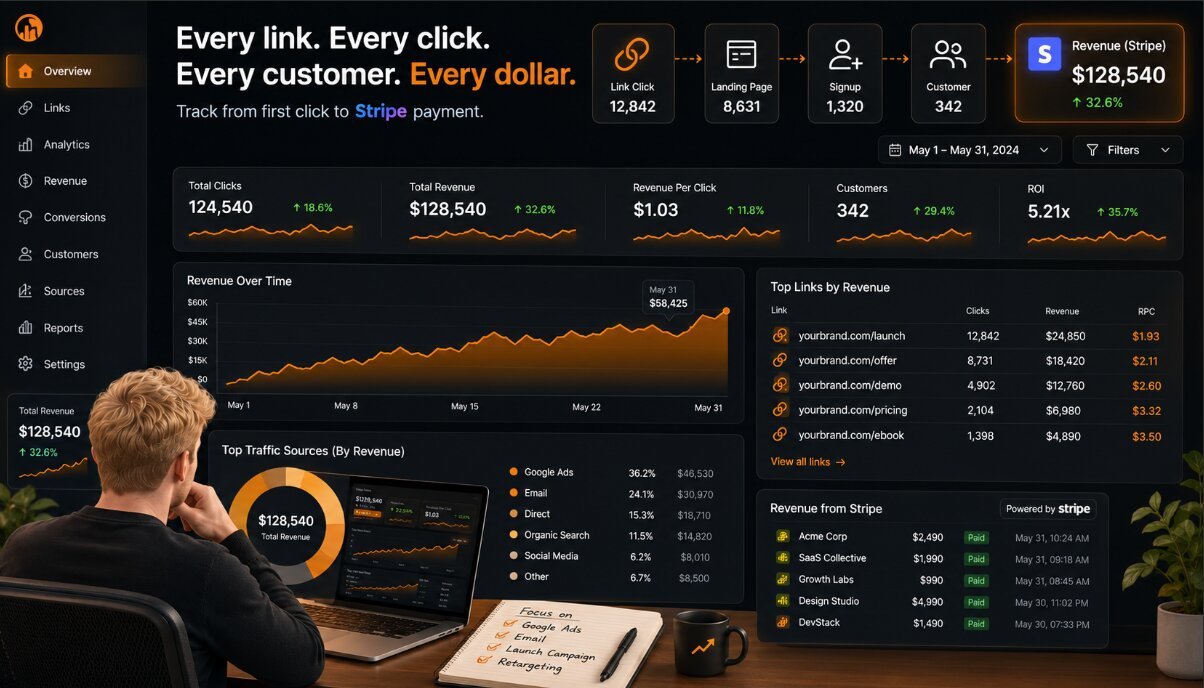
Stripe can tell you who paid. It cannot always tell you what convinced them to buy.
That gap creates a problem for SaaS founders, ecommerce brands, and growth teams. You can see revenue coming in, but still struggle to answer the question that matters:
Which marketing action actually created that customer?
Stripe tracks the transaction. Revenue attribution explains the path that created it.
Why Stripe Revenue Data Alone Isn't Enough
Stripe is excellent at handling payments.
It shows businesses important financial information:
- Payments received
- Customers
- Subscriptions
- Revenue numbers
But payment data alone does not explain the marketing journey behind those transactions.
A customer paying $500 is useful information.
Knowing that customer came from:
- A LinkedIn post
- A partner referral
- A newsletter link
- A paid ad
- A product comparison page
is what helps you grow.
Without that connection, businesses are left guessing.
They struggle to answer:
- Which campaign created this customer?
- Which link drove the conversion?
- Which content influenced the purchase?
- Which channel deserves more budget?
This is the difference between seeing revenue and understanding revenue.
The enemy is disconnected marketing and revenue data.
Many companies have payment dashboards, analytics tools, and campaign reports. The problem is that those systems often do not connect the full journey:
Marketing activity → Click → Customer → Payment → Revenue
How Connecting Stripe Data to Links Reveals True Revenue Per Click
The missing piece is connecting individual marketing links with customer revenue.
The ideal path looks like this:
Marketing link → Visitor → Customer action → Stripe payment → Revenue attribution
Once that connection exists, you can understand which traffic actually creates business results.
This is where Revenue Per Click (RPC) becomes valuable.
RPC measures how much revenue each tracked click generates.
The formula:
Revenue ÷ Clicks = Revenue Per Click
Example:
Campaign A
- 10,000 clicks
- $2,000 revenue
RPC:
$2,000 ÷ 10,000 = $0.20 per click
Campaign B
- 2,000 clicks
- $5,000 revenue
RPC:
$5,000 ÷ 2,000 = $2.50 per click
Campaign A looks better if you only care about traffic.
Campaign B is clearly stronger if you care about revenue.
More clicks do not automatically mean better marketing. Better clicks create better outcomes.
The Difference Between Stripe Data and Revenue Attribution
Stripe answers:
“Who paid?”
Revenue attribution answers:
“Why did they pay?”
Those are different questions.
Stripe is focused on the financial event.
Attribution connects that event back to the marketing decisions that created it.
For example:
A SaaS company sees 200 new subscriptions in Stripe.
That tells them growth happened.
But revenue attribution reveals:
- 80 customers came from a specific comparison article
- 60 customers came from a partner campaign
- 40 customers came from a paid search campaign
- 20 customers came from social content
Now the team knows where to invest.
Without attribution, marketing decisions often become opinions.
With attribution, they become decisions based on revenue data.
How to Connect Stripe Data to Your Links
Create Trackable Marketing Links
The first step is making every important marketing touchpoint measurable.
Track links across:
- Paid ads
- Social posts
- Email campaigns
- Partner links
- Affiliate campaigns
- Content pages
A common mistake is tracking only the campaign.
A campaign can contain dozens of different messages, audiences, and links.
The real question is not:
“Did this campaign work?”
It is:
“Which exact link inside this campaign created revenue?”
Link-level tracking gives you that visibility.
Connect Click Activity With Customer Revenue
Clicks alone are not enough.
A click shows interest.
A payment shows business value.
The goal is connecting both.
The ideal customer journey:
A user clicks a tracked link →
They visit your website →
They sign up, request a demo, or buy →
Stripe records the payment →
Revenue gets attributed back to the original source
This creates a complete picture.
Instead of seeing isolated numbers, you see the entire customer path.
Measure Which Links Create Real Revenue
Once clicks and payments are connected, you can analyze:
- Revenue per link
- Revenue per channel
- Revenue Per Click
- Customer value
This changes how businesses optimize.
Instead of chasing:
- Traffic spikes
- Click volume
- Engagement
- Impressions
teams can focus on:
- Profitable traffic
- High-value customers
- Revenue-generating campaigns
A link with 500 clicks and $5,000 in revenue is more valuable than a link with 20,000 clicks and $500 in revenue.
Use Revenue Data to Make Better Decisions
Revenue attribution helps answer practical business questions:
- Which campaigns should receive more budget?
- Which channels should be reduced?
- Which content creates paying customers?
- Which partners drive valuable customers?
This matters especially for SaaS and ecommerce companies where customer quality is more important than simple volume.
A channel producing more clicks is not always the channel producing more growth.
Stripe Revenue Attribution vs Other Tracking Methods
| Data Source | What It Shows | What It Misses |
| Stripe Dashboard | Payments and customers | Marketing source |
| Google Analytics | Traffic behavior | Revenue connection |
| UTM Tracking | Campaign source | Customer value |
| Link Tracking + Stripe | Click-to-revenue journey | Full attribution clarity |
| RPC | Revenue generated per click | True marketing impact |
Common Mistakes With Marketing Attribution
Only Looking at Payment Data
Revenue numbers matter, but they do not explain the cause.
Knowing revenue increased is different from knowing why.
Only Tracking Traffic
Traffic reports can create false confidence.
A large audience does not guarantee customers.
Using UTMs Without Revenue Context
UTM parameters help organize marketing data.
They show where traffic came from.
But they do not always show which links created the highest-value customers.
Optimizing for Clicks Instead of Customers
Clicks are a step in the journey.
They are not the final result.
The goal is not more activity.
The goal is more profitable activity.
Connect Your Marketing Links to Real Revenue
Linkorio helps founders and marketers connect links with revenue data so they can understand which marketing efforts actually create customers.
Instead of relying on disconnected dashboards, teams can see which links, campaigns, and sources generate real business results.
The focus shifts from:
“Which links got attention?”
to: “Which links created revenue?”
Conclusion
Revenue tracking is not just about knowing how much money came in.
It is about knowing what created that money.
The best marketers do not just measure payments.
They understand the path from click to customer.
Stripe shows the outcome. Revenue attribution shows the reason.
The companies that grow efficiently are the ones that know exactly which marketing actions deserve more investment.
Frequently Asked Questions
What is Stripe revenue attribution?
Stripe revenue attribution is the process of connecting Stripe payments back to the marketing actions that generated those customers, such as campaigns, links, and traffic sources.
Does Stripe show where customers came from?
Stripe shows payment and customer information, but it does not automatically provide complete marketing attribution for every customer journey.
Why is Revenue Per Click useful for Stripe tracking?
Revenue Per Click shows how much revenue each tracked click generates, helping businesses identify higher-value traffic sources.
Can I connect Stripe data to marketing links?
Yes. By using link tracking and attribution systems, businesses can connect clicks with customers and payments to understand marketing performance.
Is Stripe enough for SaaS marketing attribution?
Stripe is valuable for payment tracking, but SaaS companies often need additional attribution data to understand which campaigns create subscriptions and revenue.